Running Meta Ads
Everything a new operator needs to understand before pointing this system at a Facebook ad account: how the loop works, what it will and will not do on its own, and how domains, tracking, brand kits, approval and the optimizer fit together. Read top to bottom once — then use it as reference.
← Back to the main user guide Go-live runbook →AHow the engine works
One closed loop, running on crons. Understand the loop and every page in the app becomes obvious — each one is a window onto a different stage of it.
Meta's ranking system reads the creative itself — image, video, script, copy, landing page — and decides who to show it to. Interest targeting is no longer the main lever; creative volume and variety is. Doing that by hand is roughly two weeks of work per hundred ads. This engine makes it a daily cadence:
research pain points
  → generate on-brand creative against a brand kit
  → automated QA (brand + banned claims)
  → YOUR approval
  → publish to Meta (paused, then activated)
  → 2–3 day learning window
  → deterministic rules: kill losers, promote winners, rebudget
  → store creative DNA joined to performance
  → feed the winners' DNA back into generation
  → report every action daily
The Overview page is the loop's dashboard. The top row is spend today, conversions, CPA and ROAS; below it a 30-day spend chart. On a fresh workspace everything reads zero — that is the correct state before your first publish, not a bug.
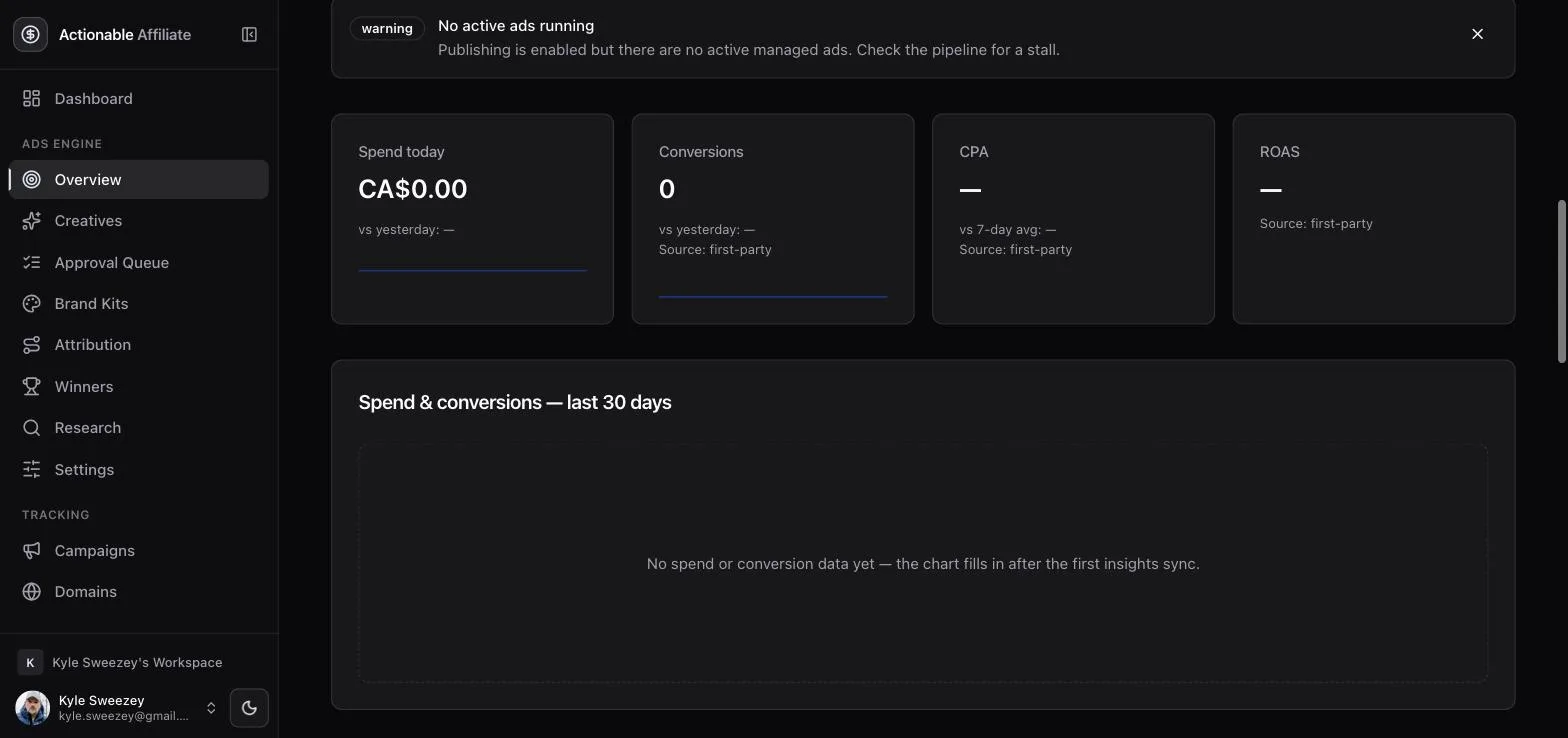
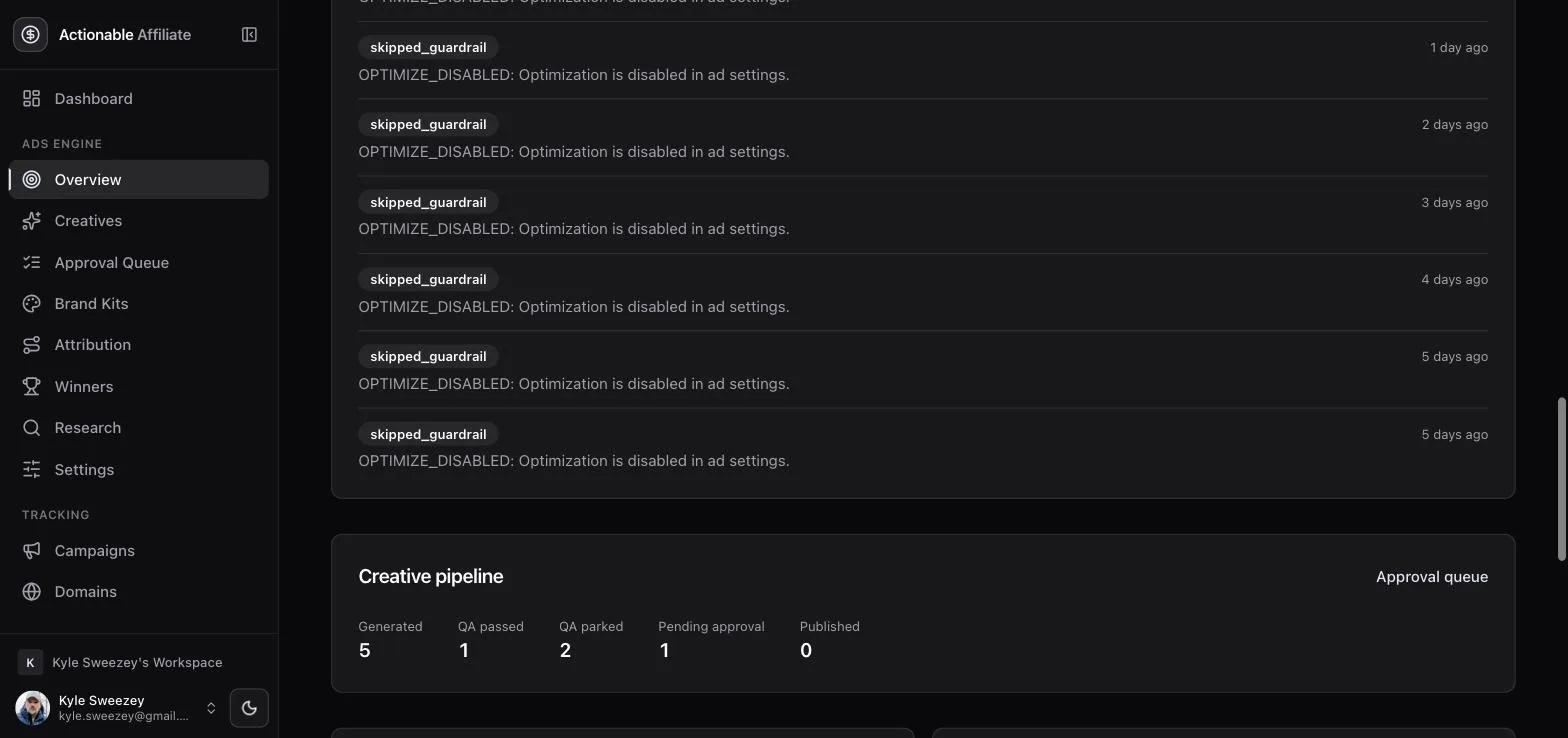
Underneath sit the alerts feed and the creative pipeline counters. Those counters are the fastest way to see where work is stuck: creatives generated, how many passed QA, how many were parked by QA, how many are waiting on your approval, and how many have actually been published.
The autonomy ladder
One setting, autonomyMode, governs how much the engine may do without you. It starts at the bottom rung and stays there until you have watched it work.
| Mode | What it does |
|---|---|
| shadow | Default. Intended actions are logged and the exact request that would have been sent is recorded. Zero writes reach Meta — this is the only mode that cannot spend money. |
| assisted | New ads still need your approval before going live. Kill and budget-scale decisions execute on their own, inside the guardrails. |
| autonomous | Reserved for a later phase. Today it behaves exactly like assisted. |
Shadow mode is not a demo mode. It runs the real rules against real synced data and writes a real audit trail; it just stops at the network call. The intended sequence is: run in shadow until you agree with every decision the log shows, then move to assisted with the per-run caps set to 1. The go-live runbook walks that rehearsal step by step.
BConnecting Meta
There is no "Connect with Facebook" button, and that is deliberate. The connection is a long-lived System User token held by your Business Manager, seeded from the environment.
What you need on the Meta side, all inside your own Business Manager — no App Review, no business verification, no public app submission:
- A Meta Business Manager with an ad account that has a payment method attached. Ads cannot activate without one.
- A developer app of type Business with the Marketing API product added. It stays private and in development mode forever; nothing is ever submitted for review.
- A System User (Business Settings → Users → System Users), assigned your ad account with Manage campaigns, your Page with Manage Page, and the app with Develop app.
- A token generated for that System User with Token Expiration: Never and the scopes
ads_management,ads_read,business_management. It is displayed exactly once.
A System User token belongs to the business, not to a person: it survives password changes and staff departures, and there is no refresh cron to fail silently at 3am. If "Never" is missing from the expiration dropdown, your Business Manager is missing two-factor auth on the admin account — enable it and retry. Full click-path in the go-live runbook.
Bootstrapping the connection
Put four values into the environment, then run one command:
META_APP_ID=…
META_APP_SECRET=…
META_SYSTEM_USER_TOKEN=…
META_AD_ACCOUNT_ID=act_…

pnpm ads:bootstrap
Bootstrap verifies the token, reads the ad account's currency, timezone and status, encrypts every credential into the database, and creates the settings row with safe defaults (autonomy: shadow, publishing off, optimization off). It is idempotent and it will never overwrite a tuned setting on a re-run. It also seeds the optional provider keys in the same pass — kie.ai for images and video, HeyGen for avatar video, OpenRouter for copy and QA, Stripe, Reddit, Telegram, Slack.
Bootstrap tries to discover your Facebook Page and Pixel automatically, but only auto-sets them when there is exactly one candidate. If your business has several Pages it leaves the field blank rather than guessing which brand your ads publish from.
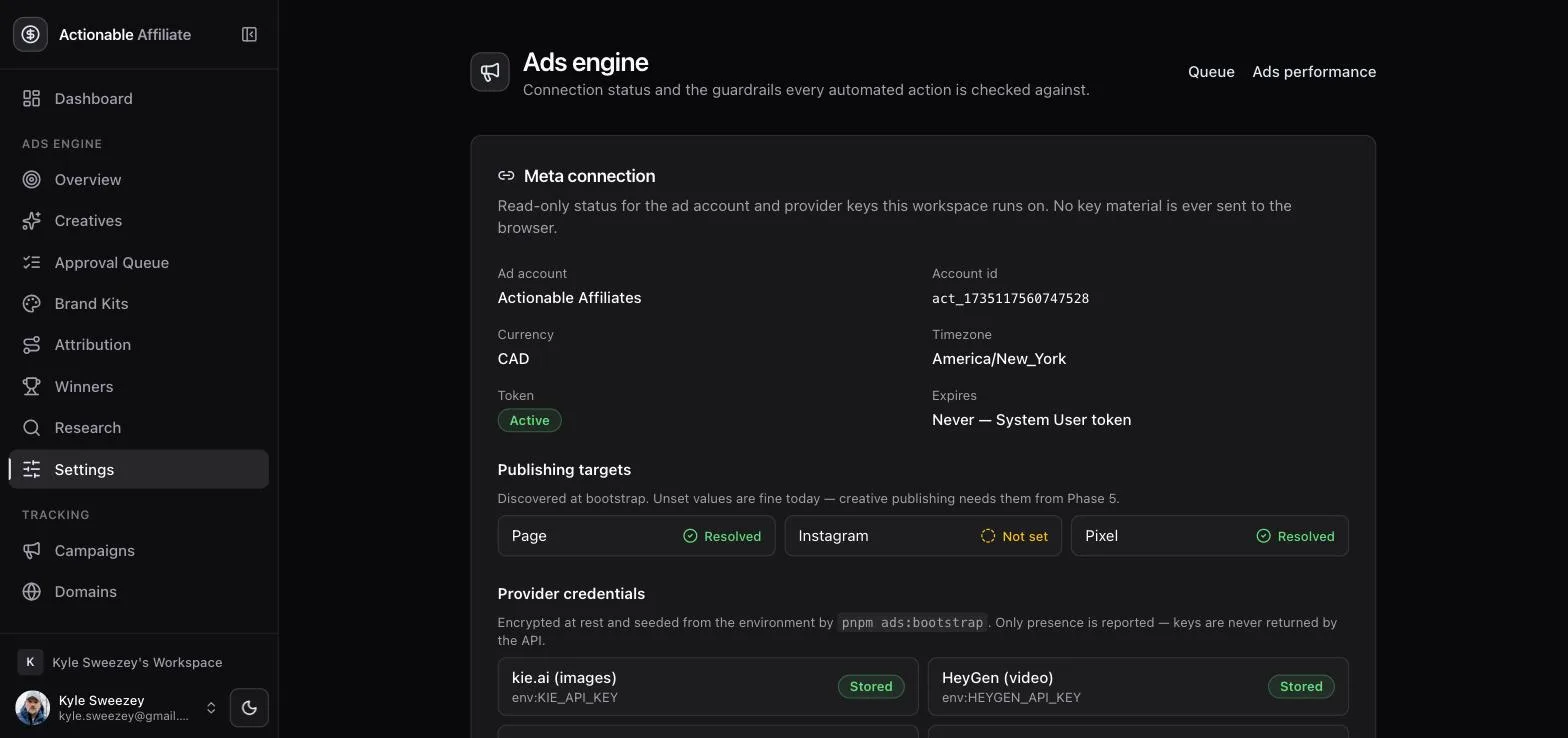
Publishing targets
Three fields decide what an ad is published as:
- Page — required. Every Meta ad is published as a Page post; without a Page resolved, publishing refuses to run. This is also the name real people see on your ad, so it is the asset worth naming carefully.
- Pixel — required whenever the optimization goal is offsite conversions (the default). It is what Meta optimizes toward and what the pixel-based conversion action reports against.
- Instagram — optional. Leave it unset and ads run on Facebook placements only.
CDomains
Every ad this engine publishes must point at a tracker link on a domain your workspace has verified. This is the rule that makes first-party attribution possible at all.
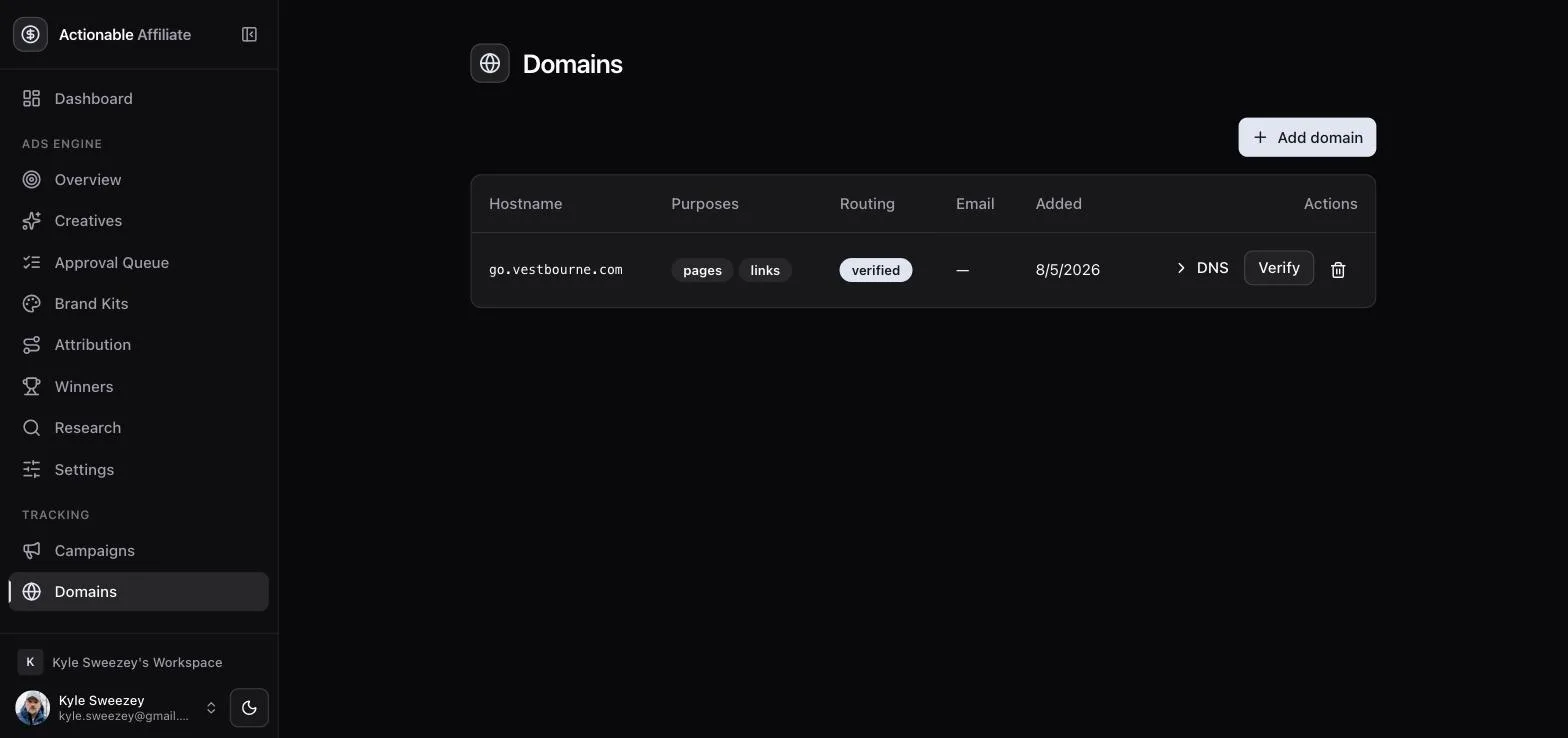
Ads do not link directly to an offer page. They link to a tracker link on one of your own domains — https://go.vestbourne.com/c/{code} — which records the click and then redirects. That is the only way to know which specific ad produced which specific conversion, and it is why domains are a prerequisite rather than a nicety.
Add a domain under Domains and pick its purposes:
- Click links — tracker links. Required for ads.
- Landing pages & forms — hosted pages served on that domain.
- Email sending — DKIM/SPF for broadcasts; unrelated to ads.
For pages and links the app adds the domain to the hosting project and hands you the DNS records to create: an A record for an apex domain or a CNAME for a subdomain, plus a TXT ownership challenge. The row shows pending until DNS resolves, misconfigured if the records are wrong, and verified once it is live. A dedicated subdomain like go.yourbrand.com is the usual choice — it keeps ad traffic off your main site's DNS.
DESTINATION_NOT_OWNED before any Meta call happens. The suffix check is strict, so a lookalike like evilexample.com does not pass as a subdomain of example.com. Non-HTTP schemes are rejected outright.Verifying the domain in this app is separate from verifying it in Meta. Meta increasingly requires a verified domain behind ad destinations and it is mandatory in some regulated verticals — that side of it is covered in the go-live runbook, along with special ad categories for financial offers.
DTracking & attribution
Meta's own conversion reporting has been degraded since iOS 14. The engine therefore keeps three parallel sets of numbers and lets you choose which one the money rules trust.
How a click gets joined back to an ad
Meta supports dynamic macros in an ad's url_tags field. The engine sets this string on every ad it publishes:
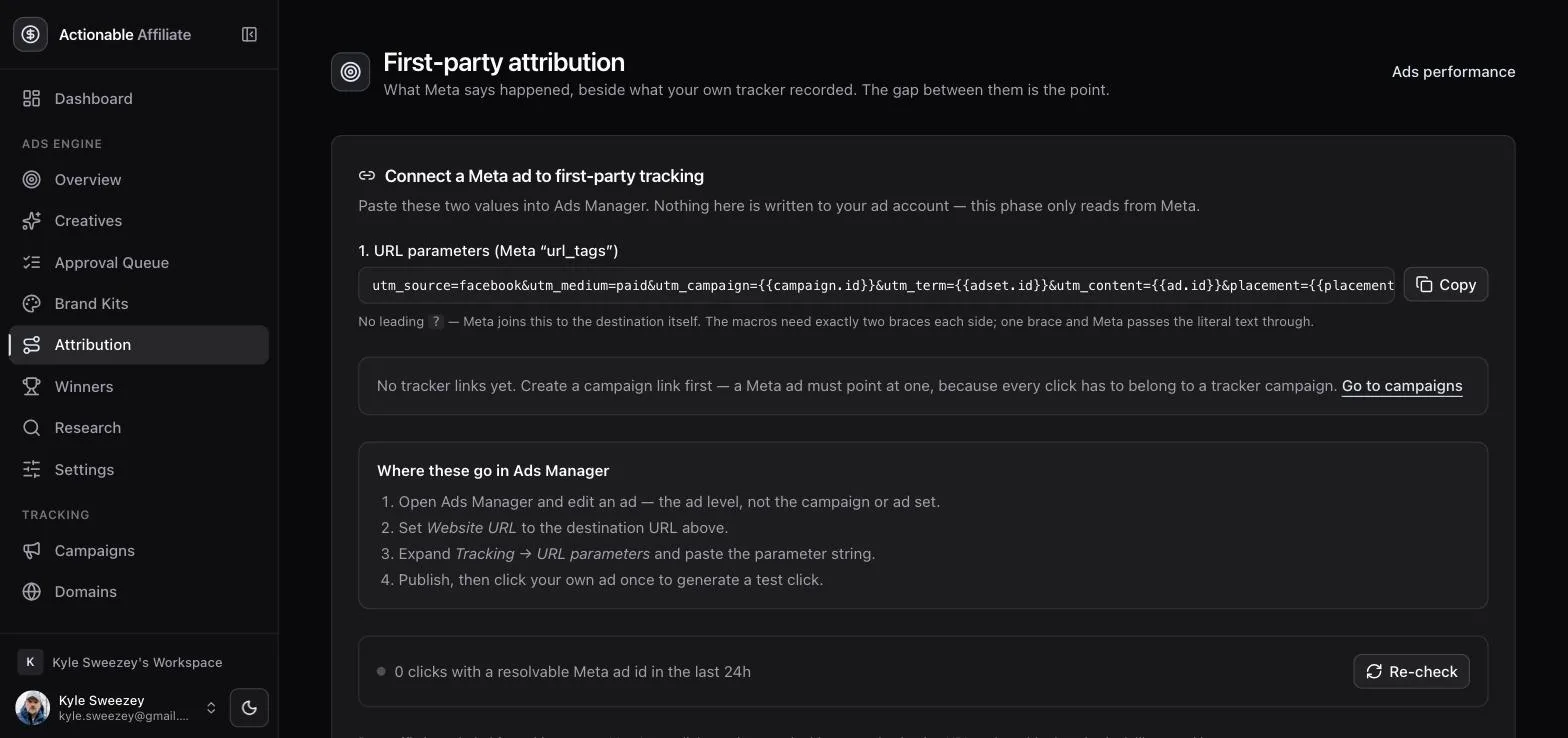
utm_source=facebook&utm_medium=paid&utm_campaign={{campaign.id}}&utm_term={{adset.id}}&utm_content={{ad.id}}&placement={{placement}}Meta substitutes the real ids at click time and appends the string to your destination URL. Your tracker records the click with utm_content set to the Meta ad id, and the attribution job joins clicks to ads on exactly that — scoped to your organization, which is a security control rather than a nicety. Conversions are then credited to the click's date, not their own, so a purchase three days later still lands on the day the ad earned it. Known bot traffic is excluded.
Ads published by the engine get this automatically. The setup card exists for the other case: an ad you created by hand in Ads Manager that you want to appear in these reports. Copy the string, edit the ad (the ad level, not the campaign or ad set), set the website URL to a tracker link, expand Tracking → URL parameters, paste, and click your own ad once to generate a test click. The status line below the card tells you whether any click in the last 24 hours carried a resolvable Meta ad id.
{{ad.id}} — one brace and Meta passes the literal text through, and URL-encoding the braces breaks the substitution silently. There is also no leading ?: Meta joins the string to the destination itself. If the comparison table shows a "Not tracked" badge, the usual cause is one of these two mistakes, or a destination that is not a tracker link.Reading the comparison table
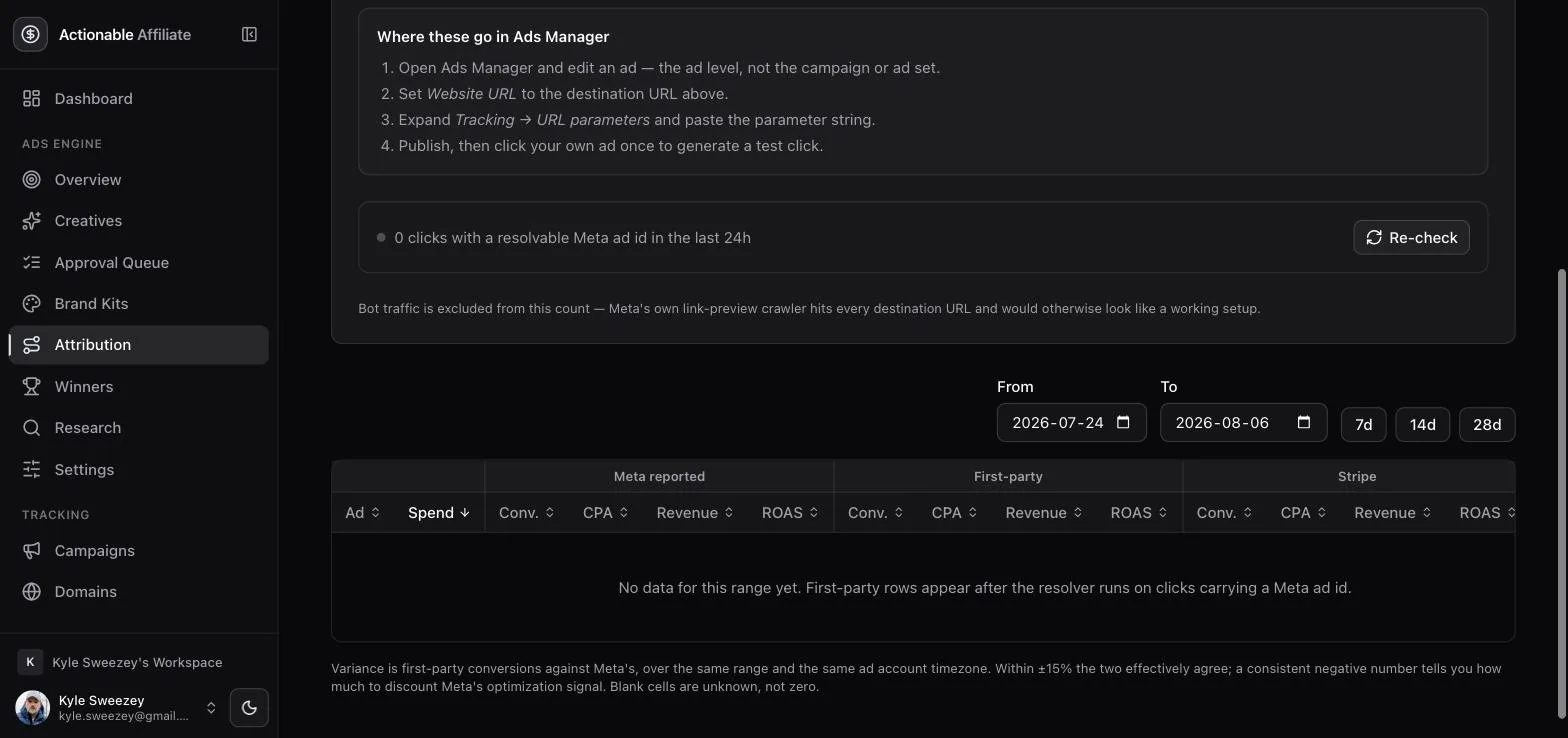
Three sources sit side by side, per ad:
- Meta reported — what Ads Manager says. Fast, but generous, and blind to anything it cannot attribute.
- First-party — your own tracker. Ground truth for clicks and conversions.
- Stripe — payment-confirmed revenue. The narrowest and most trustworthy signal, where it applies.
Each block shows conversions, CPA, revenue and ROAS, plus a variance column expressing first-party conversions as a percentage of Meta's. A gap is expected; a gap that suddenly changes shape is a signal. Note the deliberate distinction between null and zero throughout: an empty cell means "not measured", a zero means "measured, found nothing" — and CPA is never rendered as zero, because a zero CPA reads as infinite efficiency to a human skimming a table.
The three settings that make or break every CPA decision
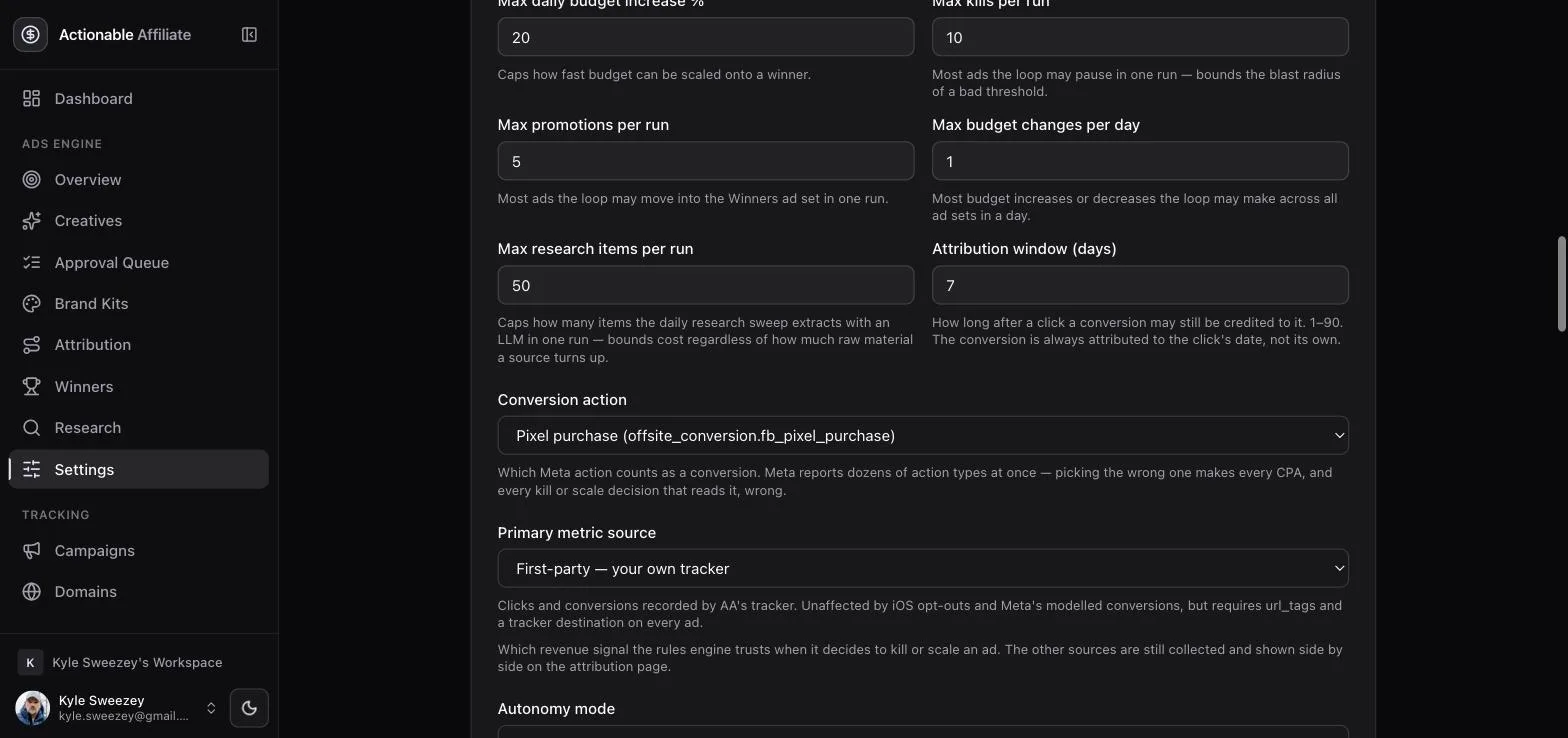
- Conversion action — which Meta action type counts as a conversion. Defaults to
offsite_conversion.fb_pixel_purchase; lead, complete registration, landing page view and link click are also offered, plus a free-text escape hatch. Get this wrong and every downstream number is poisoned: pick landing page view on a purchase funnel and your CPA looks brilliant, the optimizer promotes the ad that generates cheap window-shoppers, and it scales the budget into it. Match this to the event you actually sell on. - Attribution window — 1 to 90 days, default 7. A conversion counts only if it happened within this many days of the click. Long windows flatter slow funnels; short windows under-credit them.
- Primary metric source — first-party (your own tracker), Meta reported, or Stripe. This picks which of the three columns the optimization rules read when they compute CPA. First-party is the default and the recommended answer.
EBrand kits
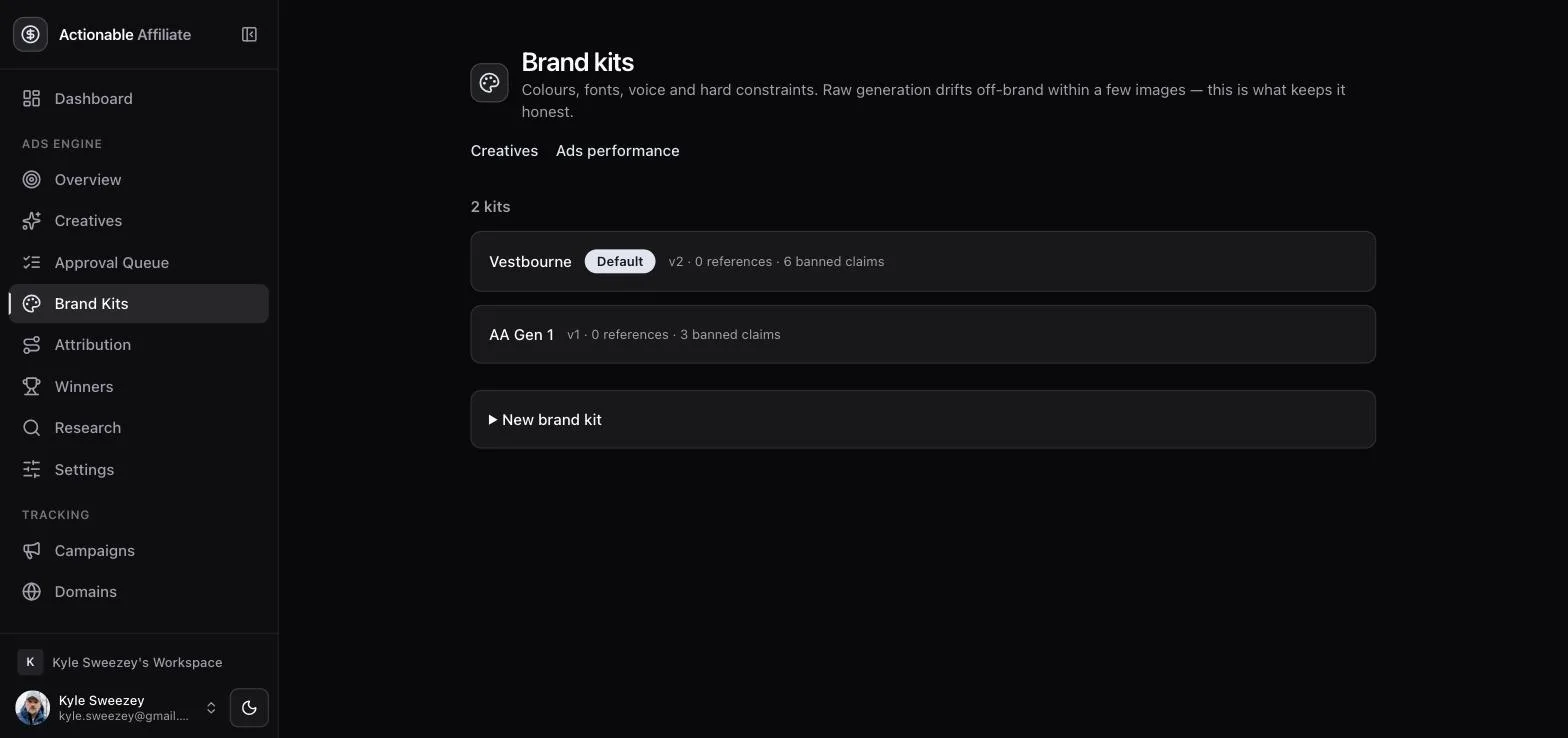
A brand kit is the contract between you and the image model. It is also the compliance boundary — banned claims and required disclaimers live here.
Generation will not run without one. If no kit exists the request fails with a plain error rather than inventing a look. One kit is marked default; kits are per workspace, and you can keep several (one per offer, say) and choose which to generate against.
What goes in a kit
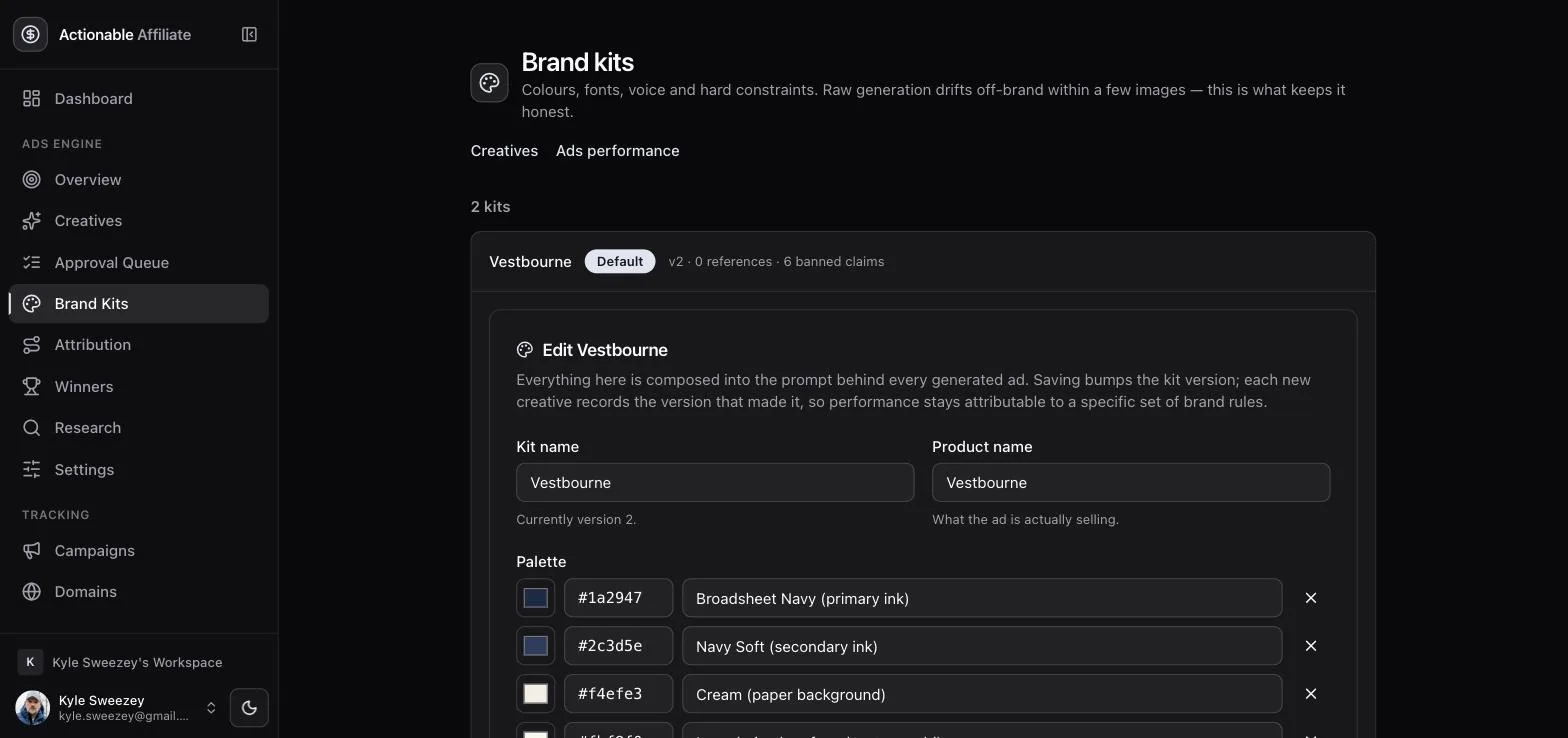
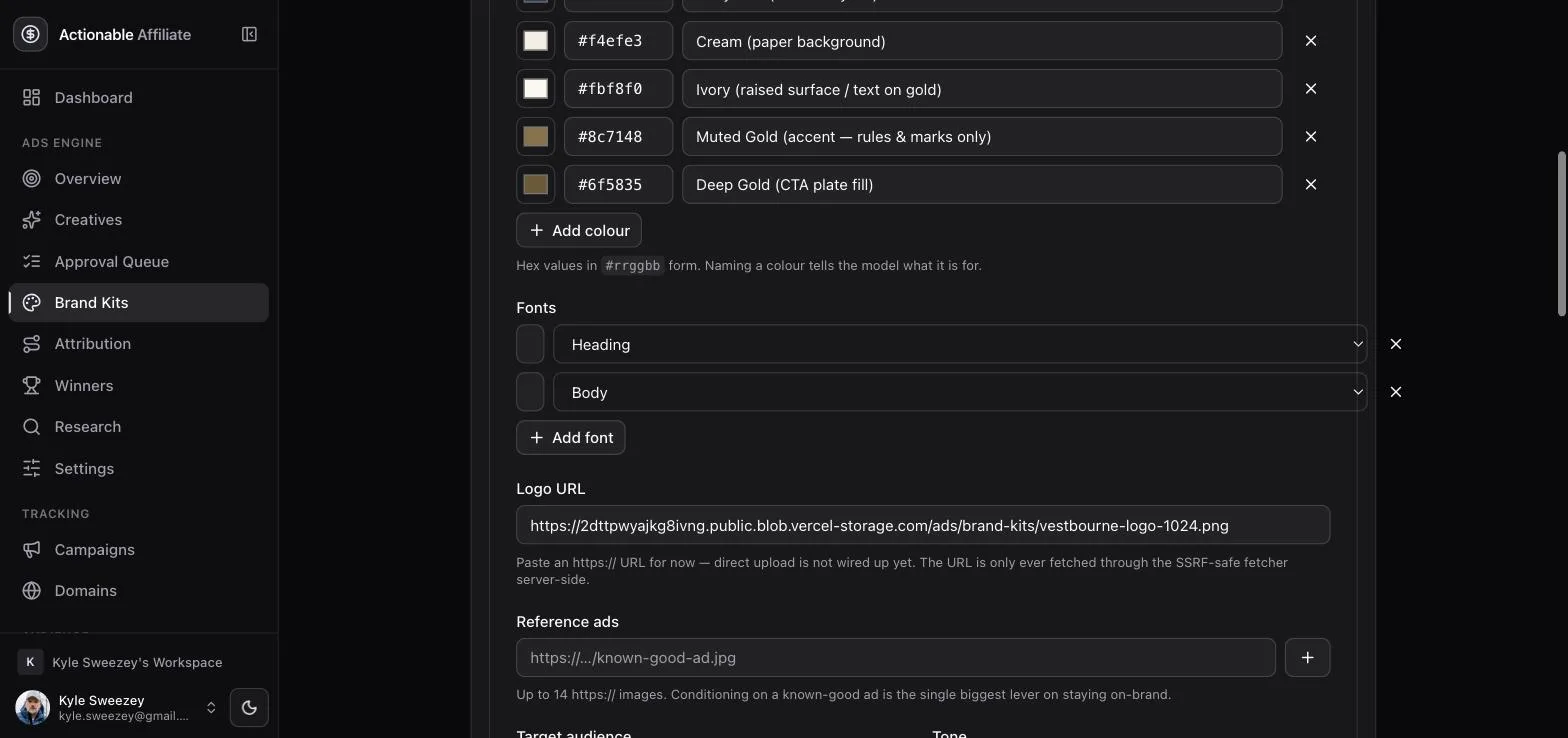
- Palette — hex swatches, each with a name. The names matter: "Ivory", "Muted Gold", "Deep Gold" tell the model what each colour is for, which is information a bare hex list does not carry. Up to 24.
- Fonts — each tagged heading or body.
- Logo URL — HTTPS only; used for the logo-present QA check.
- Product name, description, target audience, tone — the brief the model writes to.
- Banned claims — phrases that must never appear. These are enforced by an exact, case-insensitive text match on the generated copy, and that check is authoritative: a hit fails QA regardless of what the vision model thought.
- Required disclaimers — text that must appear. These are emitted first in the prompt so they can never be dropped by truncation.
- Reference ads — up to 14 image URLs the model can look at. Fourteen is not arbitrary; it is the image model's input limit.
- Research inputs — subreddits, keywords, YouTube sources and competitor Page names used by the research sweep (section I).
FGenerating creatives
The generate dialog is the only place you write anything creative. Everything downstream is checks.
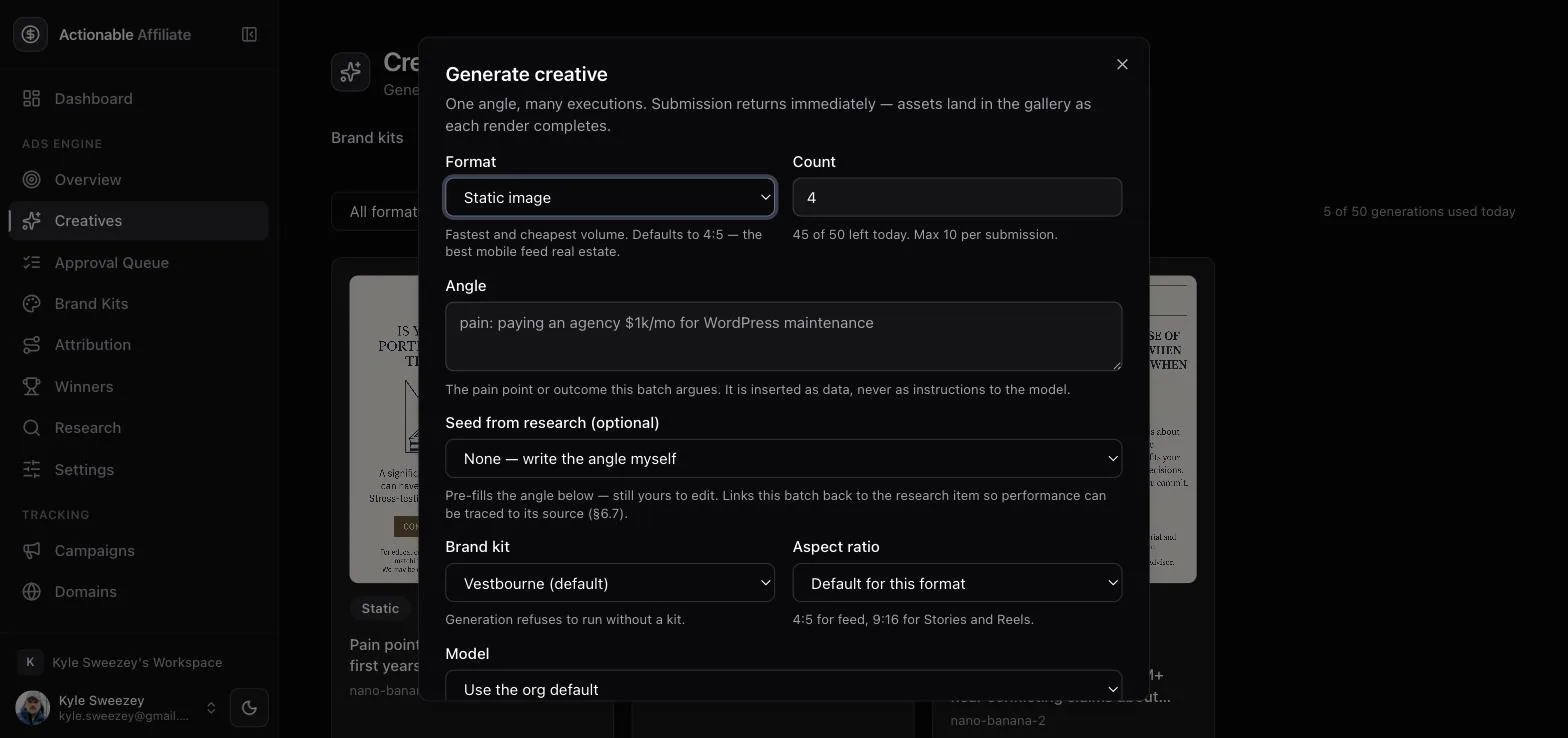
- Format — static image, video, avatar video, or copy-only variants. Static is by far the cheapest and fastest, and it is where you should start; video and avatar cost real money and minutes per asset.
- Count — how many to produce in this batch, capped at 10 per submission.
- Angle — the idea, in your words. "Retirees with $1M+ hear conflicting claims about annuities and fear locking money into something irreversible."
- Seed from research — optional: pull an angle straight out of the research library instead of typing one (section I).
- Aspect ratio — defaults to 4:5 for statics and 9:16 for video, which is what the feed and Reels want.
- Model — defaults come from settings; you rarely need to touch this per batch.
Generation is asynchronous everywhere: the request returns immediately with a task, and assets arrive later by webhook, with a sweeper cron catching any callback that never lands. Nothing in the UI blocks on an image.
Quota and QA
A daily generation quota is checked before anything is submitted — the gallery shows it as "5 of 50 used today" in this workspace. It counts against a UTC day and is a setting, not a constant. Exceeding it returns a plain error naming the number used, the limit, and how many you asked for.
Everything then passes a QA gate before it can be approved:
- A deterministic banned-claims check against the kit's list. Authoritative. A hit fails, full stop.
- A vision model pass over still images, checking that text is legible, fonts and colours are on brand, the logo is present if required, and no banned claim is visible in the artwork.
A first failure regenerates once, with the QA notes fed back in. A second failure parks the creative — it stays visible with its notes but can never be auto-approved. If the vision call itself errors, the creative is marked skipped rather than passed: an honest "nobody looked at this" instead of a pass nobody gave.
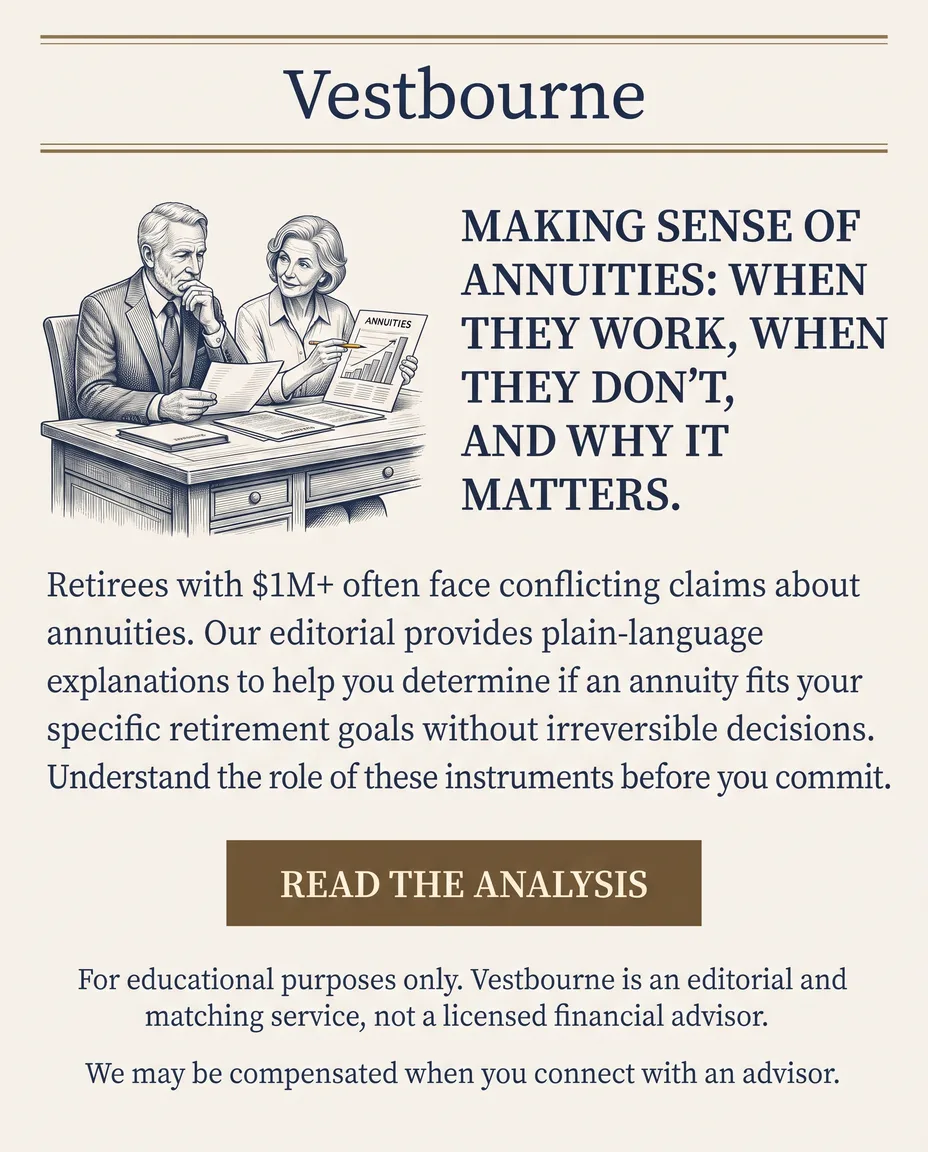
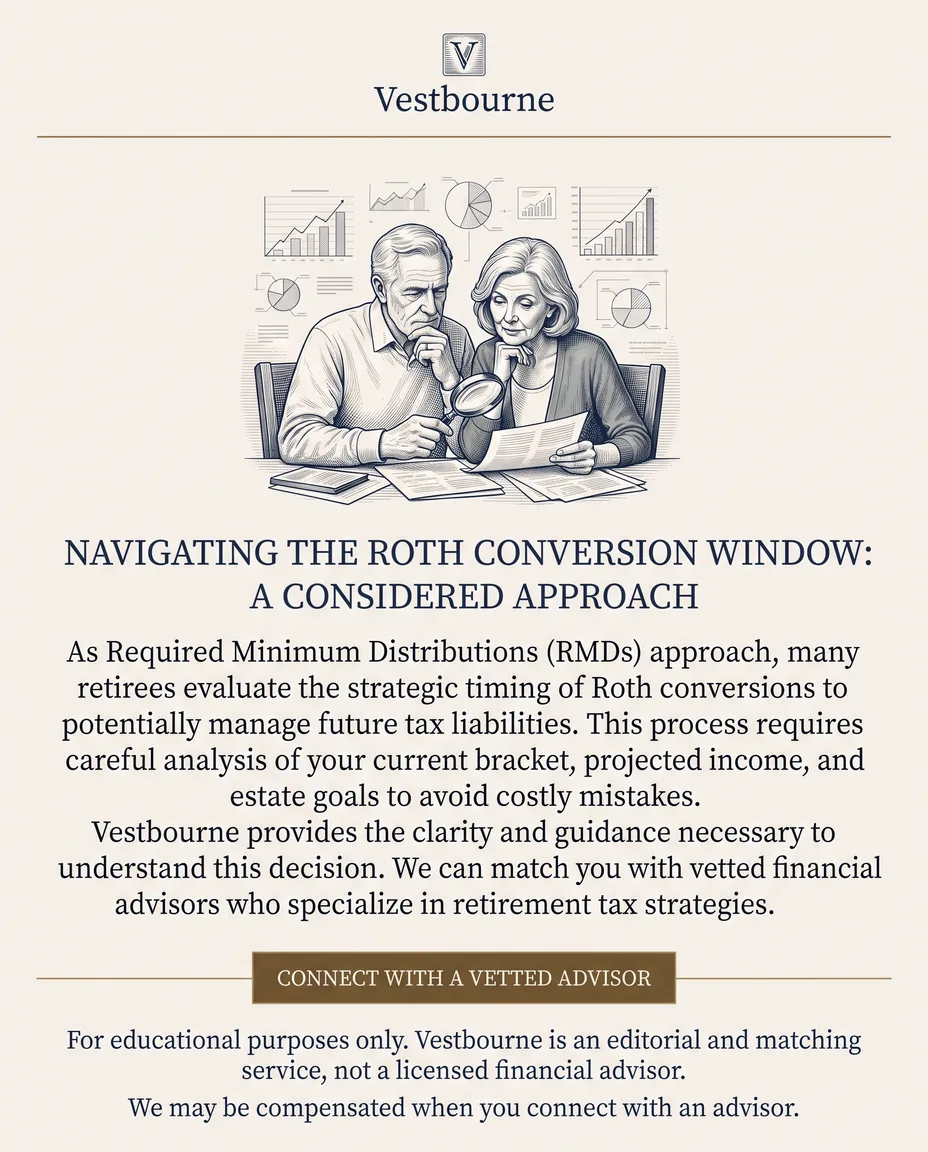
What on-brand output looks like
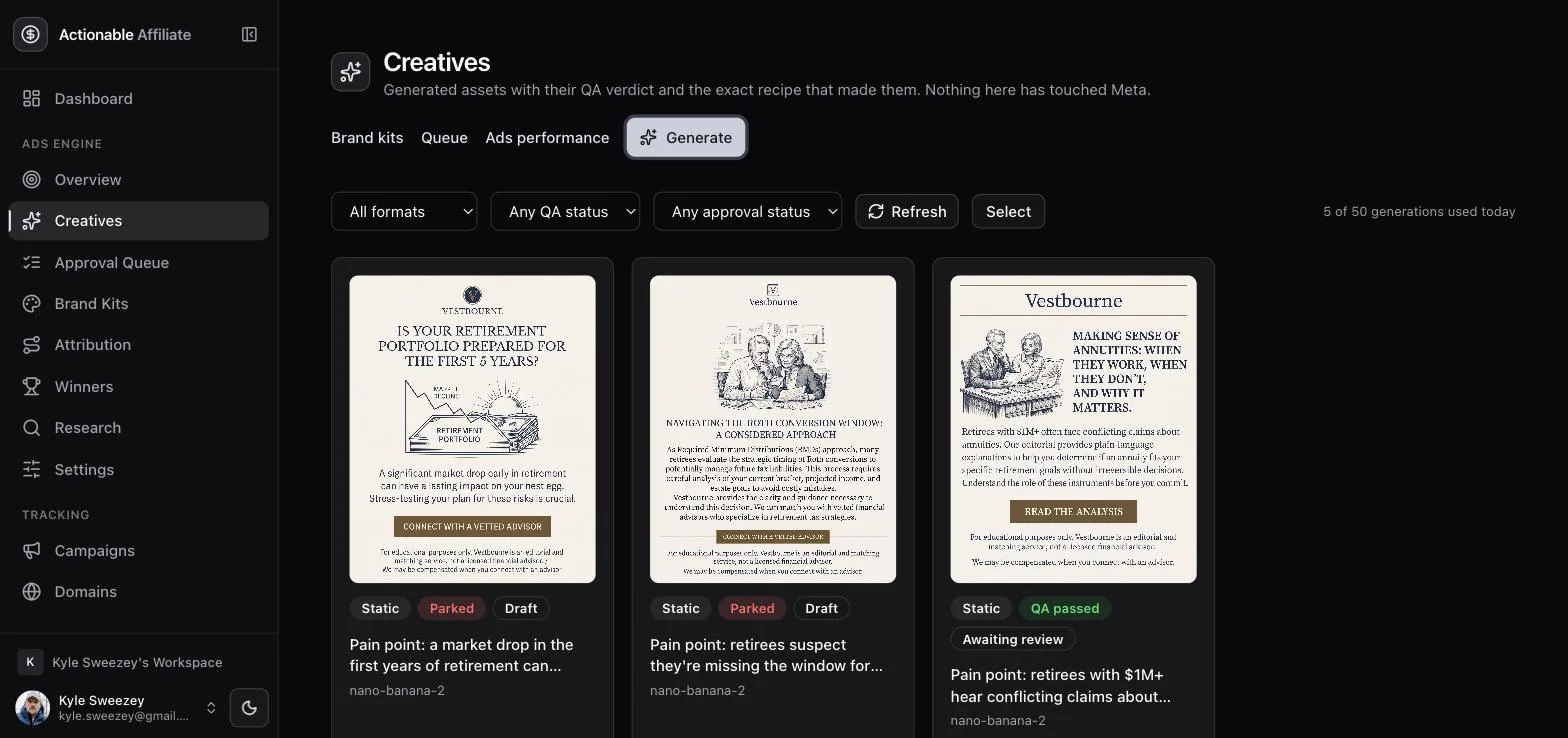
Three statics generated against the same kit, from three different angles. Same palette, same typographic voice, same disclaimer discipline — different arguments. That consistency is the kit doing its job; the variety is what the ranking system actually rewards.

GApproval & publishing
The approval queue is the human gate. It is the last point at which stopping something costs nothing.
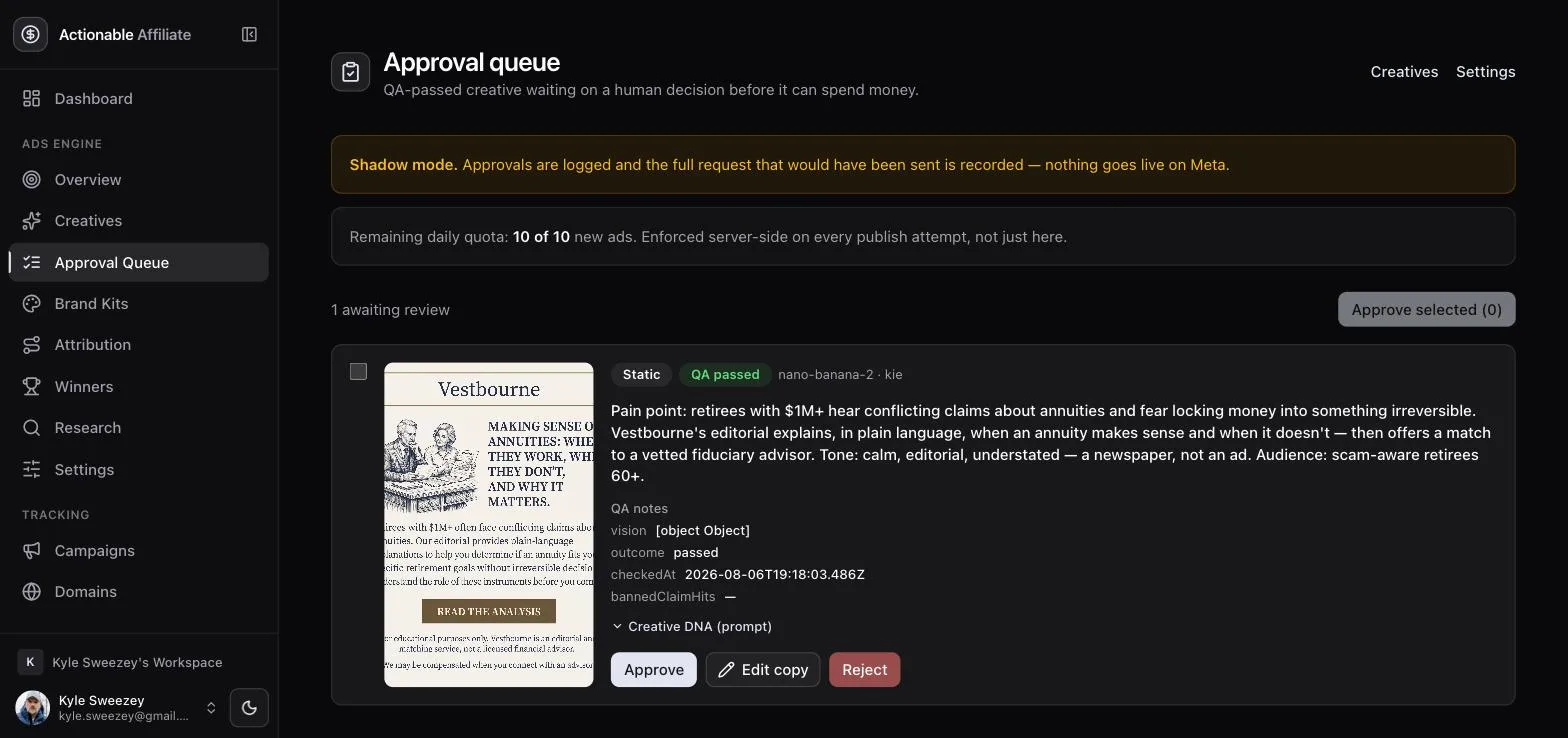
Only QA-passed creatives appear here. Each card shows the thumbnail, the angle it was generated from, the QA notes (outcome, when it was checked, any banned-claim hits) and an expandable Creative DNA panel holding the exact prompt that produced it. Your three options:
- Approve — queues it for publish.
- Edit copy — change headline, primary text or description. The asset is immutable; if the image is wrong, generate again rather than patching around it.
- Reject — a reason is mandatory. This is not bureaucracy: the rejection reasons are how you later notice that every rejected ad shared one trait.
The banner at the top of the queue tells you which world you are in. In shadow mode approvals are logged and the full request that would have been sent is recorded, but nothing goes live on Meta. The line below it is the remaining daily quota of new ads — enforced server-side on every publish attempt, never merely hidden in the UI.
What publishing actually creates
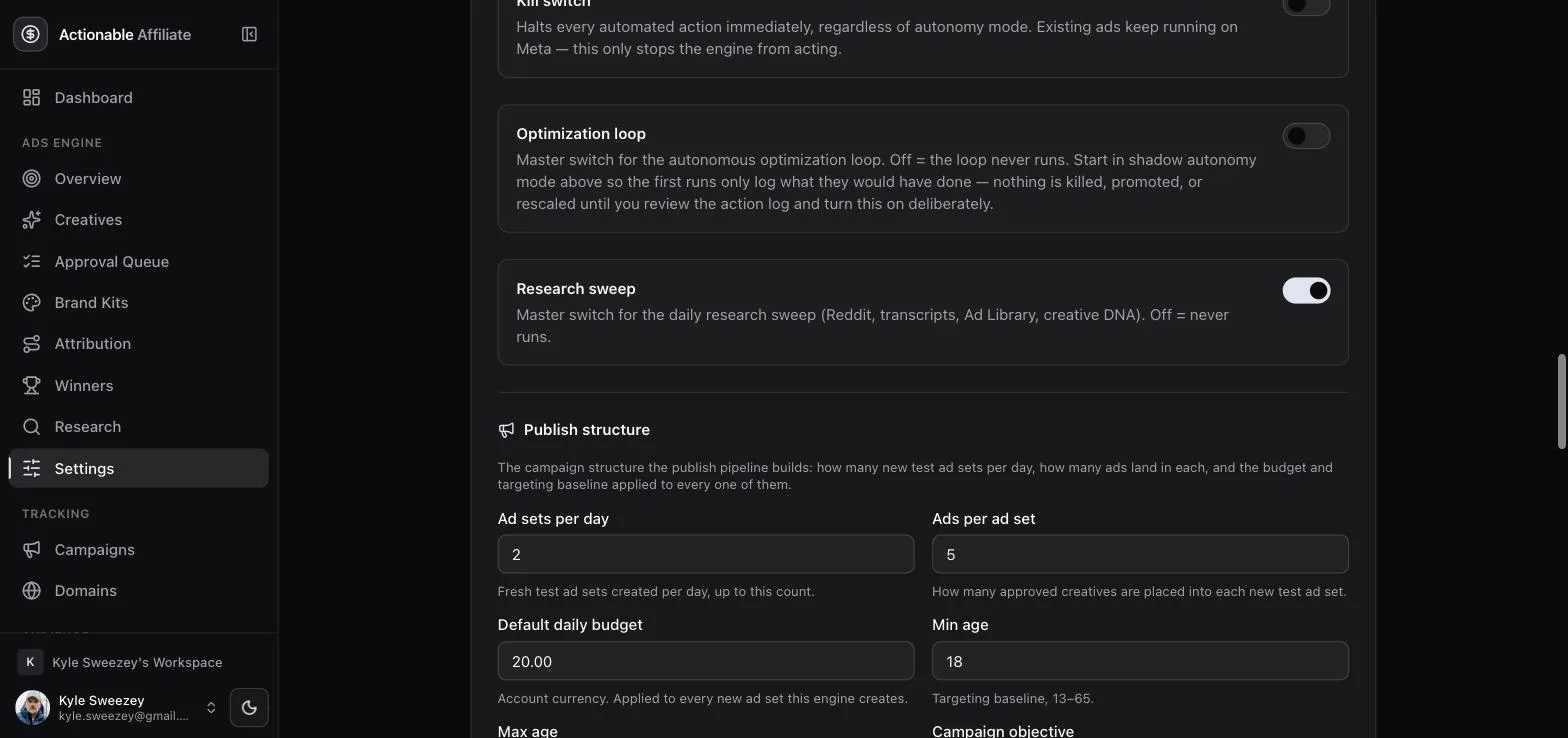
After approval a background worker builds the Meta structure. Its shape comes from your publish settings: how many testing ad sets to create per day, how many ads per ad set, the default daily budget, and the targeting baseline (countries, age range) plus any special ad categories.
Three properties of the publish path are worth knowing:
- Everything is created PAUSED. The status is hardcoded, not a parameter. Activation is a separate, deliberate act — for the very first publish you flip it on in Ads Manager yourself.
- Writes are idempotent. Each job is keyed on creative × ad set behind a unique index, and duplicate detection keys on the engine's own mirror of what it created, never on Meta campaign names. Run the publish cron twice and nothing duplicates.
- Guardrails are re-checked immediately before every single write — not once at the top of the run. A kill switch flipped mid-run stops the next call.
Guardrail order
Checks run in this order and stop at the first failure, so the reason you see is the most fundamental one:
- Kill switch — one toggle halts every Meta write in the workspace. Use it first and ask questions after.
- Publishing disabled — the
publishEnabledswitch, off by default. - Shadow mode — the write is logged, not sent.
- Daily ad limit — the new-ads-per-day quota, counted in the ad account's timezone and only against ads this engine manages.
- Daily spend cap — optional; blocks further writes once today's spend reaches it.
- Account inactive — no ad account, or Meta reports the account is not active.
- Rate limited — Meta has throttled the account and the backoff window has not elapsed.
HThe optimization loop
One run a day, pure rules, every decision logged with its reason. This is the part that spends money without asking, so it is the part with the least cleverness in it.
The run is gated first: it does nothing if the kill switch is on, if optimization is disabled, if no target CPA is set, if the account is inactive or rate-limited, or if insights data is missing or more than 24 hours old. Stale data is treated as no data — acting on yesterday's numbers as if they were today's is how these systems burn budget confidently.
Step 1 — eligibility
An ad is judged only once it has had a fair chance. It is skipped if it is excluded by you, already killed, never launched, still inside the learning window, or below the minimum spend or impressions needed to judge it. Judging too early is the single most common way to waste money here — the learning window exists because Meta's delivery has not settled before it closes.
Step 2 — kill rules
First match wins:
- No conversions over max spend — zero conversions and spend at or above the max-spend-without-conversion threshold.
- CPA over multiple — CPA above target CPA × the kill multiple.
- CTR below floor — click-through under the floor, and only once impressions are at double the judging minimum, because CTR is noisy at low volume.
Step 3 — promote
An ad with CPA under target and at least the minimum number of conversions is promoted into the persistent Winners ad set, where winners compete against each other for budget. Kills take precedence over promotions, and an ad already in the winners set is not re-promoted.
Step 4 — budget
Budget moves at most once per ad set per day and never within 24 hours of the last change. Beating target CPA with enough conversions scales the budget up by the configured percentage, clamped to the daily spend cap. CPA more than 1.5× target scales it down by 20%. Everything else is left alone — "budget stable" is a decision too, and it gets logged as one.
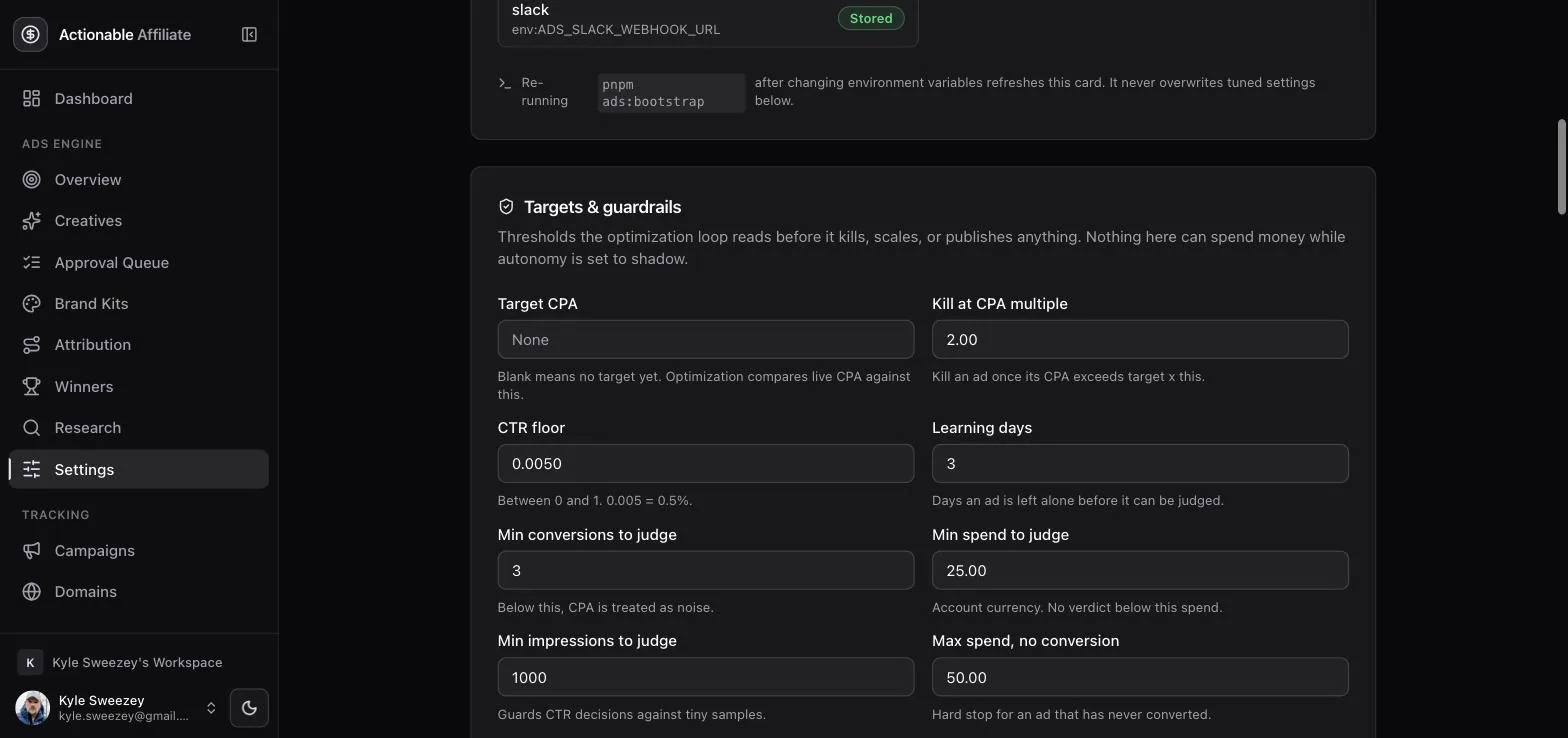
| Setting | Default | Read by |
|---|---|---|
| Target CPA | unset | Kill, promote, budget. Optimization does not run without it. |
| Kill at CPA multiple | 2.00 | Kill rule 2 |
| CTR floor | 0.0050 (0.5%) | Kill rule 3 |
| Learning days | 3 | Eligibility |
| Min conversions | 3 | Promote, budget scale-up |
| Min spend to judge | 25 | Eligibility |
| Min impressions to judge | 1000 | Eligibility (doubled for the CTR rule) |
| Max spend, no conversion | 50 | Kill rule 1 |
| Max daily budget increase | 20% | Budget scale-up |
| Max kills / promotions per run | 10 / 5 | Per-run blast radius |
The per-run caps are a blast-radius limit, not a filter. When a cap is hit, the decisions beyond it are still logged, marked as capped — so you can always see what the engine wanted to do, not just what it did.
The audit trail
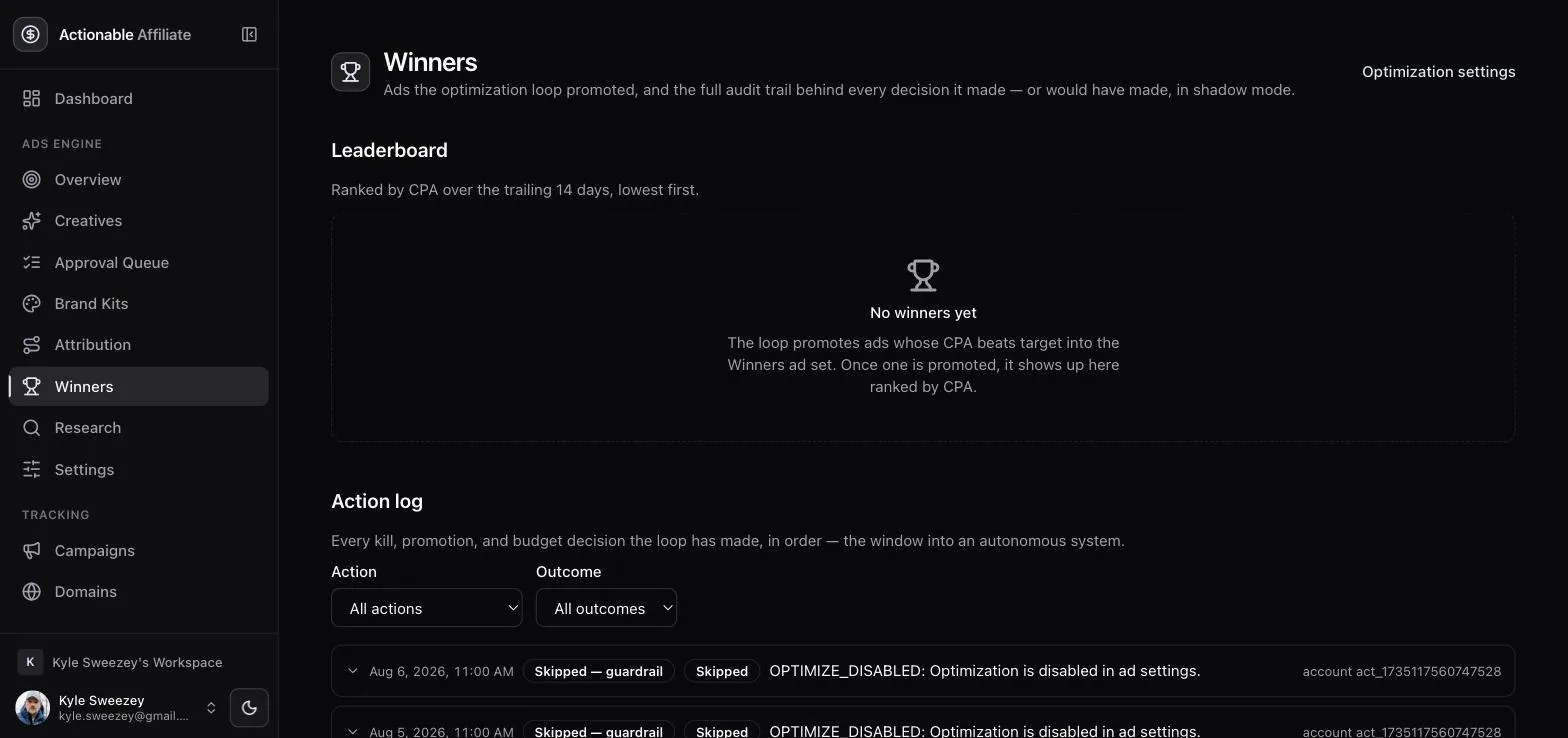
Every decision — kill, promote, budget change, and every skip with its reason — is written to the action log. The Winners page is that log plus a leaderboard of promoted ads. In shadow mode the log fills up exactly the same way; only the network call is withheld. Reading a week of it before switching to assisted is the whole point of shadow mode.
IResearch & creative DNA
An engine fed only its own output converges on the same ad within days. Research is the fix, and it is the reason this is a loop rather than a generator.
A daily sweep collects raw material and turns it into structured insights — pain points, desired outcomes, objections, competitor ads, hook patterns. Sources:
- Reddit — the subreddits and keywords configured on your brand kit. Real complaints in customers' own words.
- Transcripts — YouTube and podcast sources you list.
- Meta Ad Library — what competitors are currently running.
- Your own winners' DNA — see below.
- Manual insights — anything you know that a scraper cannot: a sales call, a support ticket, a conversation. Add it and it seeds generation like any other item.
Each run is capped at a maximum number of items across all sources, and duplicates are rejected on identity, so the library does not fill with the same thread three times.
Creative DNA
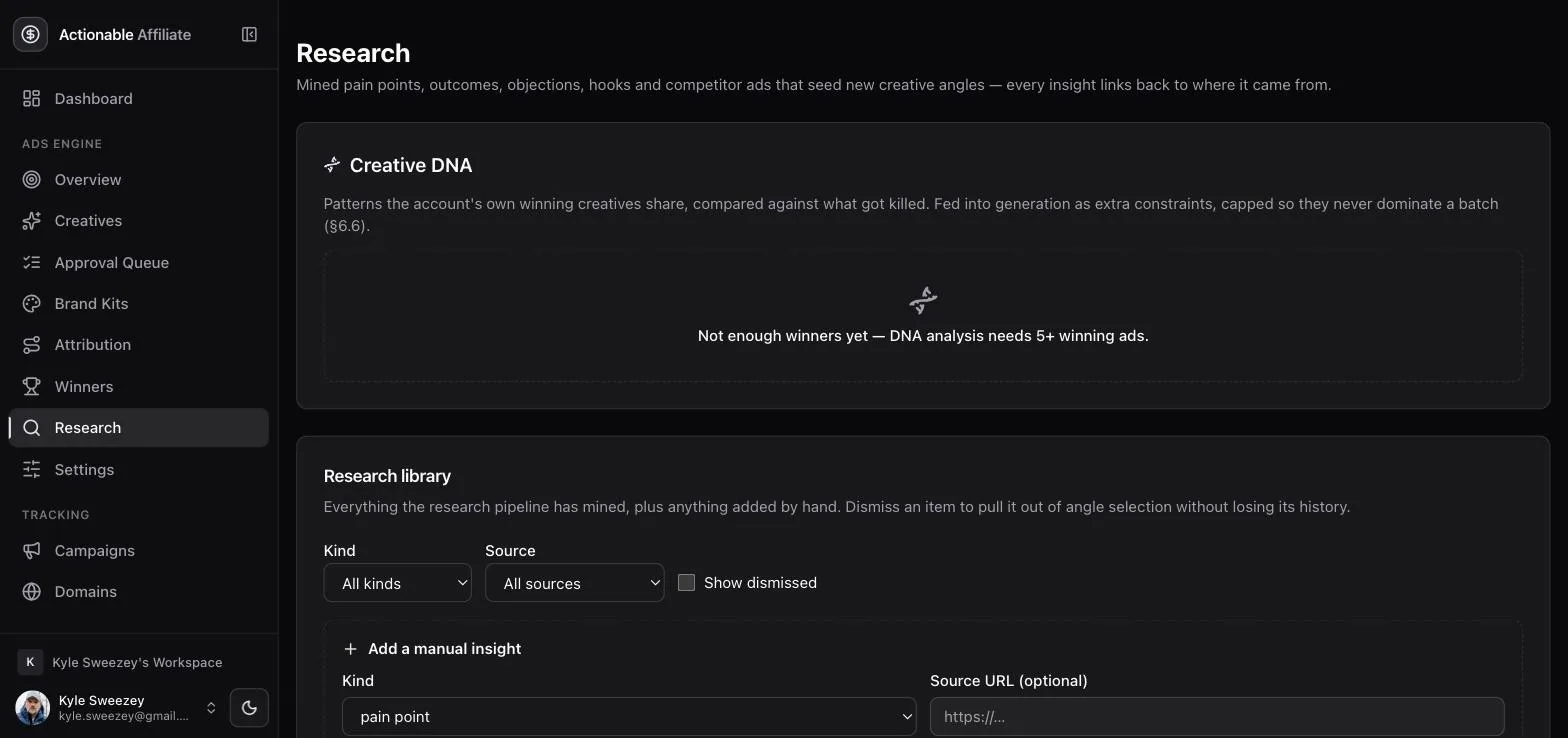
Every creative stores the exact prompt that made it, joined to how that ad went on to perform. Once you have at least five promoted winners, the DNA analysis compares those winners against a sample of killed ads and extracts what the winners have in common — as insights that feed back into generation. Below five winners it refuses to run and says so; patterns drawn from three data points are superstition.
Dismissing an item never deletes it. It is flagged inactive, drops out of the default list, and does not resurface in future sweeps — but it stays visible behind a "show dismissed" toggle, because "we tried that angle and it was wrong" is information worth keeping.
JDaily digest & alerts
Two channels, split by urgency. A digest you read with coffee; an alert that interrupts you.
The daily digest is one email, sent after the optimization run so it reports today's decisions rather than yesterday's. It carries yesterday's spend, conversions, CPA and ROAS — each labelled with which source produced it — every action the rules engine took with its rule name and reason, anything waiting on your approval, and creative thumbnails. In shadow mode it is phrased in the conditional ("would have killed…") and carries a shadow banner; a shadow digest that reads like a live one is a bug worth reporting. Recipients must be current members of the workspace, re-checked at send time.
Alerts are the interrupt path, checked hourly and deduplicated so a single condition pings once, not sixty times. They cover:
- Spend spikes beyond your configured percentage threshold
- Insights sync failures — repeated failures mean your numbers are going stale
- Token or credential problems
- Creatives waiting on approval
- Guardrail trips — anything the engine wanted to do and was stopped from doing
Channels are email, Telegram and Slack, chosen per workspace. Only warning and critical alerts push to chat; informational ones wait for the digest, because an alert channel that pings for everything gets muted within a week.